
cardoO Buds Clip
User Guide





All you want to know about
cardoO Buds Clip...
Welcome to the cardoO Buds Clip Experience
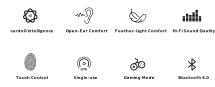
Thank you for choosing the cardoO Buds Clip. Designed for open-ear comfort, secure clip-on fit, and daily listening, these wireless Bluetooth earbuds help you enjoy music, calls, and gaming while staying aware of your surroundings. This guide will help you set up, use, and care for your cardoO Buds Clip.
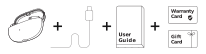
Each product package includes:
- cardoO Buds Clip
- USB-C Charging Cable
- User Guide
- Warranty Card
- Gift Card
Table of Contents
- First Steps
- Controls and Voice Prompts
- LED Indicators
- Battery and Charging
- Care and Safety
- Troubleshooting
- Warranty and Customer Support
- Regulatory Compliance
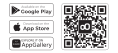
Downloading the App: Search and download the cardoO app from the Google Play Store, Apple App Store, or Huawei AppGallery. Use the QR code to download the app, activate your warranty, and access customer support. Our team is available 24/7.
Charging Before First Use: Place the earbuds in the charging case and charge them for at least 10 minutes.
Powering On: Remove the earbuds from the charging case to turn them on. If they do not turn on automatically, press and hold both earbuds until they power on.
Wearing Method: Place each earbud securely on your ear using the clip-style fit. Adjust the position until the earbuds feel comfortable and stable.
Pairing the Earbuds: Enable Bluetooth on your phone or device. Select "cardoO Buds Clip" from the Bluetooth device list. Open the cardoO app, go to "Add Device" to connect, and enjoy using your cardoO Buds Clip.
| Action | Left Earbud | Right Earbud | Result |
|---|---|---|---|
| Power on | Press and hold 6s | Press and hold 6s | Earbuds power on |
| Power off | Press and hold 6s | Press and hold 6s | Earbuds power off |
| Play / Pause | Single press | Single press | Plays or pauses audio |
| Previous track | Double press | Not assigned | Returns to the previous track |
| Next track | Not assigned | Double press | Skips to the next track |
| Volume down | Triple press | Not assigned | Lowers the volume |
| Volume up | Not assigned | Triple press | Raises the volume |
| Action | Left Earbud | Right Earbud | Result |
|---|---|---|---|
| Answer a call | Single press | Single press | Answers an incoming call |
| End a call | Single press | Single press | Ends the active call |
| Reject a call | Double press | Double press | Rejects an incoming call |
| Action | Left Earbud | Right Earbud | Result |
|---|---|---|---|
| Gaming / Basic mode | Press and hold 2s | Press and hold 2s | Switches between Gaming mode and Basic mode |
| Voice assistant | Press 4 times | Not assigned | Activates the connected phone's voice assistant |
| Recall last contact | Not assigned | Press 4 times | Calls the most recent contact |
| Status | Indicator |
|---|---|
| Power on | Green for 3 seconds, or red for 3 seconds when the battery is below 20% |
| Power off | Red light once before shutdown |
| Pairing / disconnected | Main earbud: green flashes. Secondary earbud: green flashes once every 5 seconds |
| Connected / reconnected | Green for 3 seconds |
| Low earbud battery | Red flashes every 30 seconds with "Battery Low" voice prompt |
| Open or close the charging case | 0-30%: red for 3 seconds. 30-70%: white for 3 seconds. 70-100%: green for 3 seconds |
| Press the charging case button | White flashes 1/2/3/4 times for 0-25% / 25-50% / 50-75% / 75-100% |
| Charging case charging | Breathing light by battery level: red 0-30%, white 30-70%, green 70-100%. Solid green when full |
| Earbuds charging in case | Red below 30%, green at 30% or above. Light turns off after charging is complete |
- Use a 5V/1A charger and the included USB-C cable.
- Earbud charging time: approximately 1.5 hours.
- Charging case charging time: approximately 1.5 hours.
- Music playback time: approximately 7 hours at 50% volume.
- Total playtime: up to 30 hours, based on the product packaging brief.
- Standby time: 100 hours.
- The charging case can recharge the earbuds approximately 2.5 times.
- Keep the earbuds and charging case dry. The source material does not confirm a water-resistance rating.
- Avoid using or storing the product below -15°C or above 55°C, as extreme temperature may shorten earbud or battery life.
- Use only a suitable 5V/1A power source for charging.
- Do not disassemble, puncture, crush, or expose the earbuds or case to fire.
- Keep small accessories away from children.
- Clean the earbuds with a soft, dry cloth. Do not use harsh chemicals or immerse the product in water.
- Use a comfortable volume level and avoid extended listening at high volume.
The earbuds do not power on:
- Place them in the charging case and charge for at least 10 minutes.
- Confirm the case has power.
Cannot find the earbuds in the Bluetooth list:
- Open the case, remove the earbuds, and make sure they are in pairing mode.
- Select "cardoO Buds Clip".
Connection drops:
- Keep the device within the 10 m Bluetooth range and reconnect from your Bluetooth settings.
Only one earbud connects:
- Place both earbuds back in the case, close the case, then open it and reconnect.
Low battery warning:
- Charge the earbuds in the case. A red LED and "Battery Low" prompt indicate low earbud battery.
Controls do not respond:
- Press the physical button area clearly.
- If needed, reset using the charging case button after confirmation from support.
The cardoO Buds Clip comes with a two-year warranty that covers defects in materials and workmanship under normal use. This warranty is valid from the date of purchase and applies only to the original purchaser.
Claiming Warranty: To claim your warranty, please retain your proof of purchase. Contact our customer service team for assistance with any warranty-related concerns.
Customer Support: For any inquiries or issues related to your cardoO devices, our dedicated support team is available 24/7. You can reach us by scanning the provided QR code.
cardoO Buds Clip (model: CGLWXA06) complies with the Radio Equipment Directive 2014/53/EU, operating within the 2402-2480 MHz frequency band (BT & BLE). Max. RF Output Power (EIRP): 0.62 dBm (BT); -2.13 dBm (BLE).
Designed by cardoO. Made in China.
Get in touch!

hi@cardoo.co

16852

Messenger

Maadi, Cairo
Get in touch!
hi@cardoo.co
16852
Messenger
Maadi, Cairo
Create a ticket
Can't find what you need? Our award-winning customer care team is here.