
cardoO Ring
User Guide





All you want to know about
cardoO Ring...
Table of Contents
1. First Steps
2. Control
3. Battery and Charging
4. Precautions
5. Troubleshooting
6. Warranty and Customer Support
7. Regulatory Compliance
- CardoO Ring
- Charging Case
- User Guide
- Warranty Card
- Gift Card
Downloading the App
Search and download cardoO from the Google Play Store, Apple App Store or AppGallery.
Powering On
• Connect the ring to the Charging case to turn it on.
Wearing Method
• Wear the ring on your index, middle, or ring finger for optimal data monitoring.
• Ensure the sensor is positioned on the inside of your finger for accurate measurement of heart rate and blood oxygen levels. Pairing the Ring
• Open the cardoO App, go to "Add Device" to connect it, and enjoy using your cardoO Ring.
Touch Sensor & Gesture Controls
• The CardoO Ring features an advanced touch sensor
allowing you to control functions through direct touch or
by tapping on a surface.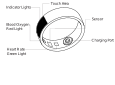
1- Social Media Scroll
• Open your favorite social media app (e.g., Instagram,
TikTok, Facebook).
• Use the ring’s touch area to swipe up or down to scroll
through your feed.
• Tap twice to like a post (if supported by the app).
2- Music Touch Control
• Open your favorite media app (e.g., Spotify, YouTube
Music, Apple Music).
• Tap once to play/pause music.
• Swipe up/down to skip to the next/previous track
3- Tasbih Counter Mode
• Navigate to the control section to enable the Tasbih
Mode.
• Tap on the ring’s touch area to count each recitation.
• The ring will store your count history, and you can reset
it in the app.
4- Remote Photo Capture
• Navigate to the control section to enable the
Photography function.
• Open your camera app.
• Position your phone for the perfect shot.
• Long press on the ring to take a photo or start and 5- E-Book Page Flip
• Open your e-book reader (Kindle, Apple Books, Google
Play Books).
• Swipe up on the ring to turn to the next page.
• Swipe down to go back to the previous page.
Battery Specifications
Battery Type: Lithium Polymer
Capacity: 15mAh (18mAh for Size 10 and above)
Battery Life: 5-7 days
Charging Method: Magnetic Charging
Charging Time: ~1.5 hours
Charging Indicators
Red Light Flashing: Charging
Green
Light Flashing: Fully Charged
Before using your Ring, follow these safety guidelines:
• Select a suitable ring size to avoid excessive tightness.
• Keep the sensor dry and clean.
• If irritation or discomfort occurs, discontinue use and consult a doctor.
• Do not expose the device to water for extended periods.
• Avoid disassembling, modifying, or inserting foreign objects into the device.
• Keep away from strong magnetic fields that may interfere with functionality.
• If the ring is damaged or overheats, stop using it and contact support.
Note: This device is not a medical tool and should not replace professional health advice.
Ring won’t turn on?
• Ensure the ring is charged by connecting it to the
charging cable.
• Check if the charging contacts are clean and properly
aligned.
Connection issues?
• Make sure Bluetooth is enabled on your smartphone.
• Restart the CardoO App and re-pair the ring.
• If issues persist, reset the ring by placing it on the
charger for 10 seconds.
Inaccurate Health Tracking?
• Ensure the ring is worn on the correct finger with the
sensor facing inward.
• Keep your finger clean and dry for better sensor accuracy.
The cardoO Ring comes with a one-year warranty that
covers defects in materials and workmanship under
normal use.
This warranty is applicable from the date of
purchase and extends only to the original purchaser.
Claiming Warranty
To claim the warranty, please retain your purchase receipt
as proof of purchase.
Contact our customer service team
for assistance.
Customer Support
For any inquiries or issues that arise with your cardoO
Ring, our dedicated support team is available 24/7.
You can reach us by scanning the provided QR code
cardoO Ring adheres to the Radio Equipment Directive
2014/53/EU, operating within the 2402 to 2480 MHz
frequency band: Max. RF Output Power (EIRP): 19 dBm
for BLE 1Mbps (Bluetooth Low Energy).
Welcome to the CardoO Experience
Welcome to the cardoO Experience Thank you for choosing the cardoO Ring. Designed for effortless smart control, advanced health tracking, and a seamless lifestyle, this innovative wearable brings technology to your fingertips.
Get in touch!

hi@cardoo.co

16852

Messenger

Maadi, Cairo
Get in touch!
hi@cardoo.co
16852
Messenger
Maadi, Cairo
Create a ticket
Can't find what you need? Our award-winning customer care team is here.