
cardoO Watch 2
User Guide





All you want to know about
cardoO Watch 2...
Welcome to the cardoO Watch 2 Experience
Thank you for choosing the cardoO Watch 2. Designed to offer more than just connectivity, it combines precision engineering with user-friendly features to enhance your tech experience. Available in two designs, Orbit and Apex, it helps you stay active, track your health, and stay connected throughout the day. This guide will help you set up, use, and care for your cardoO Watch 2.
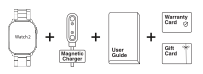
Each product package includes:
- cardoO Watch 2
- Magnetic Charger
- User Guide
- Gift Card
- Warranty Card
Table of Contents
- First Steps
- Features Overview
- Operating Instructions
- Charging
- Safety Information
- Troubleshooting
- Warranty and Customer Support
- Regulatory Compliance
Downloading the App: Search and download the cardoO app from the Google Play Store, Apple App Store, or Huawei AppGallery. Use the QR code to download the app, activate your warranty, and access customer support. Our team is available 24/7.
Powering On: Press and hold the rotary button for 5 seconds to power on, then follow the on-screen prompts to select your preferred language.
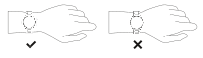
Wearing Method: Wear the cardoO Watch 2 on your wrist about one finger's width from the wrist bone, and adjust the strap for a comfortable fit. For heart rate monitoring, wear the watch slightly tighter to ensure optimal sensor contact.
Pairing Your Watch: Open the cardoO app and log in or create an account. Enable Bluetooth and location services on your phone. Tap "Add Device", then scan the QR code on your watch or select "Find Device" from the list. Confirm the pairing request on both devices.
Tips: Update the app to the latest version for the best experience. On the first connection with an iPhone, tap "Pair" when the reminder pops up to enable incoming call and instant message notifications. On the first connection with Android, follow the "Permissions" reminder to grant permissions for full functionality.
The cardoO Watch 2 Series: The series comes in two distinctive designs to suit your style and functionality preferences. Both models integrate advanced features to deliver a premium smartwatch experience.
| Specification | cardoO Watch 2 Orbit | cardoO Watch 2 Apex |
|---|---|---|
| Watch face | Round | Square |
| Display | 1.43-inch AMOLED | 2.01-inch AMOLED |
| Resolution | 466 × 466 | 410 × 502 |
| Peak brightness | Up to 1,000 nits | Up to 1,000 nits |
| Model number | CEGWAO01 | CEGWAA01 |
Get Active with cardoO Watch 2: Track your fitness and achieve your goals with over 100 exercise modes. From walking and running to cycling and triathlons, the watch records key activity data, including steps, distance, calories burned, and heart rate, helping you monitor your progress and stay on top of your fitness journey.
Stay Healthy, Stay Informed: Keep track of your health with continuous heart rate monitoring, sleep analysis, SpO2 tracking, and stress monitoring. Female health tracking helps monitor important wellness information and menstrual cycle data, making it easier to stay informed about daily health trends.
Seamless Communication: Stay connected with Bluetooth HD calling, AI chatting, and smart social notifications. Make and receive calls directly from your wrist, view incoming messages, and use quick replies when supported.
Stunning Display and Customization: Enjoy vivid visuals on the AMOLED display, available in 1.43 inches for Orbit and 2.01 inches for Apex. With up to 1,000 nits peak brightness, the screen stays clear even under bright sunlight. Customize your experience with 3D animated watch faces, different menu styles, and Always-On Display options.
Enjoy Lifestyle Essentials: Control music, check the weather, set reminders, and use tools like the timer, stopwatch, calculator, and flashlight. You can also control your phone camera, locate devices, play games, and use raise-to-wake, Do Not Disturb, and power-saving modes.
| Button | Action | Result |
|---|---|---|
| Rotary button | Single press | Opens the menu or returns to the home screen |
| Rotary button | Press and hold 5s | Powers the watch on or off |
| Rotary button | Rotate | Scrolls through options |
| Side button | Single press | Opens workout modes or returns to the previous screen |
| Gesture | Result |
|---|---|
| Swipe up | Opens notifications |
| Swipe down | Opens quick settings |
| Swipe left | Opens shortcut functions |
- Attach the magnetic charger to the watch's charging port, making sure the metal pins connect properly.
- Use a certified adapter rated 5V/0.5A or above.
- If the watch does not power on after a long period of inactivity, clean the charging pins and try again.
- The cardoO Watch 2 is not a medical device and should not be used as a substitute for professional medical judgment. Always consult a healthcare provider for medical advice.
- Failure to follow these safety instructions could result in fire, electric shock, injury, or damage to the cardoO Watch 2 or other property. Make sure all safety guidelines are read and understood before using the watch.
- Avoid dropping, burning, or puncturing the device. Do not use it if it is visibly damaged.
- Do not disassemble the watch. Contact authorized service providers for repairs.
- Do not replace the battery yourself. Contact support for servicing.
The watch does not power on:
- Make sure the watch is charged.
- Clean the charging pins and try again.
Sync issues:
- Make sure Bluetooth is enabled and the phone is within range.
- Restart both devices if necessary.
Inaccurate readings:
- Wear the watch snugly.
- Clean the sensors regularly.
Notifications not syncing:
- Check the app permissions and Bluetooth connectivity.
Short battery life:
- Reduce the screen brightness.
- Turn off features you don't need, such as Always-On Display (AOD).
Touchscreen unresponsive:
- Restart the watch.
- Make sure your hands are clean and dry.

The cardoO Watch 2 comes with a one-year warranty that covers defects in materials and workmanship under normal use. This warranty is valid from the date of purchase and applies only to the original purchaser.
Claiming Warranty: To claim your warranty, please retain your proof of purchase. Contact our customer service team for assistance with any warranty-related concerns.
Customer Support: For any inquiries or issues related to your cardoO devices, our dedicated support team is available 24/7. You can reach us by scanning the provided QR code.
cardoO Watch 2 Orbit (model: CEGWAO01) complies with the Radio Equipment Directive 2014/53/EU, operating within the 2402-2480 MHz frequency band (BT & BLE). Max. RF Output Power (EIRP): 5.387 dBm (BT); 4.113 dBm (BLE).
cardoO Watch 2 Apex (model: CEGWAA01) complies with the Radio Equipment Directive 2014/53/EU, operating within the 2402-2480 MHz frequency band (BT & BLE). Max. RF Output Power (EIRP): 6.123 dBm (BT); 4.893 dBm (BLE).
Designed by cardoO. Made in China.
Get in touch!

hi@cardoo.co

16852

Messenger

Maadi, Cairo
Get in touch!
hi@cardoo.co
16852
Messenger
Maadi, Cairo
Create a ticket
Can't find what you need? Our award-winning customer care team is here.